> For the complete documentation index, see [llms.txt](https://docs-vnext.kiflo.com/llms.txt). Markdown versions of documentation pages are available by appending `.md` to page URLs; this page is available as [Markdown](https://docs-vnext.kiflo.com/partner-enablement/assets/how-to-share-co-branded-assets-with-partners.md).
# How to share cobranded assets with partners?
{% hint style="warning" %}
The cobranding option is only available on the **Unlimited** plan.
{% endhint %}
Cobranding in Kiflo allows you to create sales or marketing collaterals only once and customize them automatically with partners' information.
It works with PDF files and placeholders. Kiflo takes care of customizing *on-the-fly* the cobranded assets when partners view or download them.
## Creating cobranded assets
Cobranding assets work with PDF files only. You need to add *Text Fields* and set their name with one of the valid placeholders below.
List of valid placeholders:
| Placeholder | Description |
| ---------------------------- | ----------------------------------------------------------------------------------------------------------------------------------------------------------------------------------------------------------------------------------------------------------------------------------------------------------------------------------------- |
| kiflo.partner.name | Insert the name of the partner |
| kiflo.partner.logo.square | Insert the squared logo uploaded by the partner from its partner portal |
| kiflo.partner.logo.rectangle | Insert the rectangular logo uploaded by the partner from its partner portal |
| kiflo.partner.referrallink |
Insert a valid referral link using the partner referral code Example: kiflo.partner.referrallink:"" Will insert:
|
Please note these placeholders are case-insensitive.
### Inserting logos
Partners can upload their own logos from their partner portal. There are two logos:
* One squared, 64x64 pixels
* One rectangular, 256x64 pixels
Please refer to this page to understand how partners can upload logos: [How do partners upload their logos?](/manage-partners/partner-records/how-do-partners-upload-their-logos.md)
When inserting logos Kiflo will resize the images to fit the boundaries of the *Text Fields* the your PDF *file.* We recommend resizing the *Text Fields* to match the expected dimensions and sticking to one of the valid ratios (64x64 or 256x64).
Examples:
* If the T*ext Field* is 32x32 px and you insert the placeholder *kiflo.partner.logo.square,* the inserted image will be resized to 32x32 px. Matching the same ratio so it will render correctly.
* If the Text Field is 320x240 px and you insert the placeholder kiflo.partner.logo.rectangle, the inserted image will be stretched to 320x240 px. The ratio is different and so it won't render correctly.
### Step-by-step using Adobe Acrobat
* Open your PDF file
* Go to **Prepare Form**
* From the top toolbar select **Add a text field**:

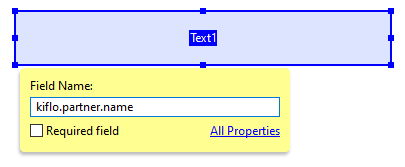
* Then set the field name with one of the placeholders:
{% hint style="info" %}
**Note**
You can add multiple fields with the same name in a single PDF file. Kiflo will replace all placeholders.
{% endhint %}
## Sharing cobranded assets
In order to upload cobranded assets you need to follow the steps defined in [How to upload an asset?](/partner-enablement/assets/upload-an-asset.md#upload-files-from-the-computer)
From the upload form, you can also define the permissions to determine who can access the new asset: [How to define access on assets?](/partner-enablement/assets/define-access-on-assets.md)
Kiflo automatically detects all the placeholders in the PDF file. If the uploaded asset contains cobranding placeholders you'll see the list of all valid placeholders (in the red section below):

Finally, click on **Upload** to add the new cobranded asset.
## Downloading cobranded assets
Partners can view and download cobranded assets just like regular assets. Cobranded assets are generated dynamically and placeholders are replaced "on the fly" when partners access them.
{% hint style="info" %}
**Note**
As a channel manager, you can only view and download the original file. Cobranded assets are only generated on the fly for partners.
{% endhint %}
---
# Agent Instructions
This documentation is published with GitBook. GitBook is the documentation platform designed so that both humans and AI agents can read, navigate, and reason over technical content effectively. Learn more at gitbook.com.
## Querying This Documentation
If you need additional information that is not directly available in this page, you can query the documentation dynamically by asking a question.
Perform an HTTP GET request on the current page URL with the `ask` query parameter, and the optional `goal` query parameter:
```
GET https://docs-vnext.kiflo.com/partner-enablement/assets/how-to-share-co-branded-assets-with-partners.md?ask=&goal=
```
`ask` is the immediate question: it should be specific, self-contained, and written in natural language.
`goal` is optional and describes the broader end goal you are ultimately trying to accomplish on behalf of the user. GitBook uses it to tailor the answer towards what is most useful for that goal.
The response will contain a direct answer to the question and relevant excerpts and sources from the documentation.
Use this mechanism when the answer is not explicitly present in the current page, you need clarification or additional context, or you want to retrieve related documentation sections.