> For the complete documentation index, see [llms.txt](https://docs-vnext.kiflo.com/llms.txt). Markdown versions of documentation pages are available by appending `.md` to page URLs; this page is available as [Markdown](https://docs-vnext.kiflo.com/manage-partners/partner-teams/partner-roles-permissions.md).
# Partner roles & permissions
Partner team members each hold one of four roles that determine what they can see and do in the partner portal. This article describes each role and explains how roles combine with your partner program settings.
Roles let you comply with the *principle of least privilege*: a partner's sales rep can work on leads and deals without seeing the commissions their company earns, and an executive sponsor can follow the business without being able to change anything.
Roles apply to **partner** team members only. Roles for your own partnership team are described in [User roles & permissions](/account-settings/users-security/user-roles.md).
## The four roles
Every partner team member has exactly one role at any time. A partner can have several team members with the same role, including several **Managers**.
**Manager**
Access everything available to the partner: pipeline, content, rewards, payouts, business plans, Account Mapping, team member management, and the partner's account settings.
Examples: the partner's owner, the sales director.
**Sales Rep**
Work on the pipeline: view and manage leads, deals, customers, tasks, comments, meetings, and Account Mapping collaborations, and view content. Sales Reps cannot see rewards, payouts, or business plans, cannot upload or manage Account Mapping data sources, and cannot reach team member management or the partner's account settings.
Examples: the partner's sales reps working on deals.
**Content Reader**
View **Assets**, **Help Center**, and **News** only. Everything else is hidden.
Examples: the partner's marketing team members who only need your co-branded material or the IT team accessible technical documentation.
**Stakeholder**
Read-only access to everything a Manager can see, except team member management and the partner's account settings. Stakeholders cannot create, edit, or delete anything.
Examples: the partner's CEO.
{% hint style="info" %}
Whatever their role, partners can **never validate deals or create customers and transactions**. Those actions remain yours.
{% endhint %}
## Roles work together with your program settings
A role never grants more than your partner program allows. A team member's access is what their **program settings** enable, narrowed down by their **role**. If a program setting is off, nobody at that partner gets the functionality, whatever their role. If a setting is on, only the roles it applies to get it.
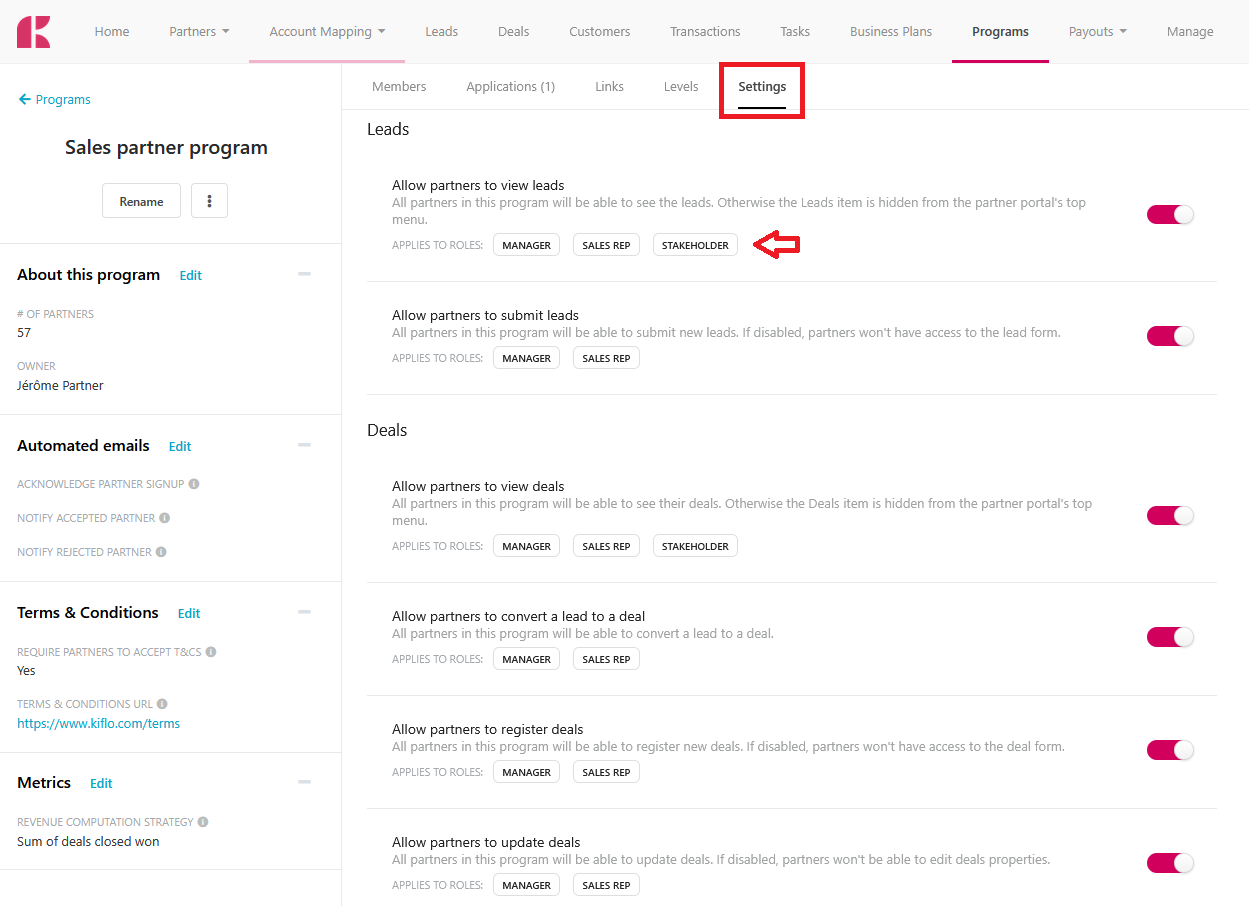
On a program's **Settings** tab, each setting shows the roles it applies to, so you can see the effect of a change before you make it:
A partner program's Settings tab, showing several settings with their Applies to roles labels underneath each description.
{% hint style="info" %}
**Account Mapping**
Inside the Account Mapping module, only Managers can add and manage data sources. Sales Reps and Stakeholders work with the overlaps and collaborations that result from them.
{% endhint %}
## Roles and the Main contact
[The Main contact](/manage-partners/partner-records/change-partners-main-contact.md) flag is separate from the role. It decides one thing. Completing the partner's onboarding requires being **both** the Main contact **and** a Manager. A Manager who is not the Main contact cannot complete onboarding, and a Main contact who is not a Manager cannot either.
{% hint style="warning" %}
**Tips**
If you demote your Main contact below Manager, make sure another team member is both, or the partner will not be able to move through onboarding.
{% endhint %}
## What each role sees in the partner portal
Sections and actions a role does not have access to are hidden, so a team member never sees an option they cannot use. The **Leads**, **Deals**, **Rewards**, **Payouts**, **Business Plan**, **Assets**, **Help Center**, **Links**, and **Tasks** items in the partner portal's top menu appear only for the roles that can use them.
## What happened to your existing team members
{% hint style="info" %}
**Backward compatibility**
Partner roles were introduced on August 9th, 2026. Permissions for existing partners have been changed automatically following the rule below.
{% endhint %}
When roles were introduced, existing partner team members were assigned a role automatically:
* Each partner's **Main contact** became a **Manager** and keeps the same access as before.
* All other team members became a **Sales Rep**, so they lost access to business plans, rewards, and payouts.
Review your partners' team members and adjust the roles that do not match what you want. Changing a role takes effect the next time the team member loads a page.
---
# Agent Instructions
This documentation is published with GitBook. GitBook is the documentation platform designed so that both humans and AI agents can read, navigate, and reason over technical content effectively. Learn more at gitbook.com.
## Querying This Documentation
If you need additional information that is not directly available in this page, you can query the documentation dynamically by asking a question.
Perform an HTTP GET request on the current page URL with the `ask` query parameter, and the optional `goal` query parameter:
```
GET https://docs-vnext.kiflo.com/manage-partners/partner-teams/partner-roles-permissions.md?ask=&goal=
```
`ask` is the immediate question: it should be specific, self-contained, and written in natural language.
`goal` is optional and describes the broader end goal you are ultimately trying to accomplish on behalf of the user. GitBook uses it to tailor the answer towards what is most useful for that goal.
The response will contain a direct answer to the question and relevant excerpts and sources from the documentation.
Use this mechanism when the answer is not explicitly present in the current page, you need clarification or additional context, or you want to retrieve related documentation sections.