> For the complete documentation index, see [llms.txt](https://docs-vnext.kiflo.com/llms.txt). Markdown versions of documentation pages are available by appending `.md` to page URLs; this page is available as [Markdown](https://docs-vnext.kiflo.com/manage-partners/onboarding/what-are-onboarding-actions.md).

# What are onboarding actions?

Onboarding actions are tasks that must be completed by partners during the onboarding process. These actions can be completed from their partner portal. There are two main purposes:

1. Automate partner onboarding so you can focus on other tasks
2. Encourage new partners to sign in to their portal and get used to using it

This article gives an overview of what is possible with onboarding actions.

{% hint style="info" %}
**Before you begin**

* Read: [How to create an onboarding pipeline?](/manage-partners/onboarding/how-to-manage-onboarding-pipelines.md)
* Read: [How to customize onboarding stages?](/manage-partners/onboarding/how-to-customize-onboarding-stages.md)
  {% endhint %}

## Overview <a href="#overview" id="overview"></a>

Onboarding actions are defined in the onboarding stages. In each stage partners must complete all defined actions before moving automatically to the next stage.

Some actions require approval from one channel manager in order to be completed. Some actions are automatically completed as soon as done by partners.

### Statuses

To help you track the completion of actions, rely on their statuses.

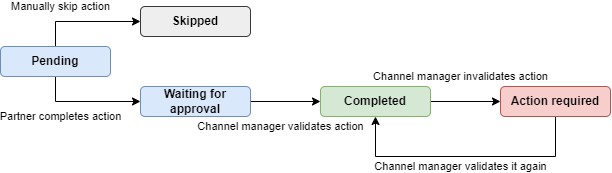
<div data-with-frame="true"><figure><img src="https://3041514930-files.gitbook.io/~/files/v0/b/gitbook-x-prod.appspot.com/o/spaces%2FKkJn82Qo5a0Y4fOsoQzo%2Fuploads%2Fgit-blob-753926a32d2d4ae4c4048f0bc498aca32771ad3b%2F64ff09bd6fa0952cf5a60e8e.png?alt=media" alt="Onboarding actions workflow"><figcaption><p>Onboarding actions workflow</p></figcaption></figure></div>

**Pending**

The action is not yet done by the partner. It can be manually skipped at this point. Only channel managers can decide to skip actions.

**Waiting for approval**

The partner completed the action (i.e.: uploaded a document or filled in a form) but it needs to be validated by one channel manager. Once validated the status will change to *Completed*.

**Completed**

The action is completed: it has been done by the partner and validated if the validation was required.

If the action was validated it can be *invalidated* to force the partner to complete it again. The status will move to *Action required* in such case.

**Action required**

The action was validated but has been invalidated by one channel manager. The partner is notified an must complete it again.

**Skipped**

The action has been skipped manually by one channel manager. The partner did not complete it at all nor can complete it later.

## Type of actions <a href="#type-of-actions" id="type-of-actions"></a>

There are four types of actions that can be added as part of an onboarding pipeline:

### View asset

Partners must view an asset created in the *Assets library*. It can be a PDF presentation, a slide share, or even a link to an external resource. As soon as the asset is viewed or downloaded the action is marked as *Completed*. No validation is required.

In the example below partners must download the NDA:

<div data-with-frame="true"><figure><img src="https://3041514930-files.gitbook.io/~/files/v0/b/gitbook-x-prod.appspot.com/o/spaces%2FKkJn82Qo5a0Y4fOsoQzo%2Fuploads%2Fgit-blob-7443a59c0d8afd0972028b6d06565eb8b6133a82%2F64ff0bc2f15ed05267de5726.png?alt=media" alt="Example of view asset action on the partner portal"><figcaption><p>Example of view asset action on the partner portal</p></figcaption></figure></div>

### Read article

Partners must read an article from the [*Help center*](/partner-enablement/help-center/create-faq.md). It can be training materials on how to use the partner portal for instance. As soon as the article is read the action is marked as *Completed*. No validation is required.

In the example below partners must get trained on how to submit leads:

<div data-with-frame="true"><figure><img src="https://3041514930-files.gitbook.io/~/files/v0/b/gitbook-x-prod.appspot.com/o/spaces%2FKkJn82Qo5a0Y4fOsoQzo%2Fuploads%2Fgit-blob-8ad7d5a3d9bff491078145950b2ab4f28a6a6113%2F64ff113bb7432c05c604dfe6.png?alt=media" alt="Example of read article action on the partner portal"><figcaption><p>Example of read article action on the partner portal</p></figcaption></figure></div>

### Provide information

Partners must fill in a form in order to provide information. It can be company legal details used to prepare the contract.

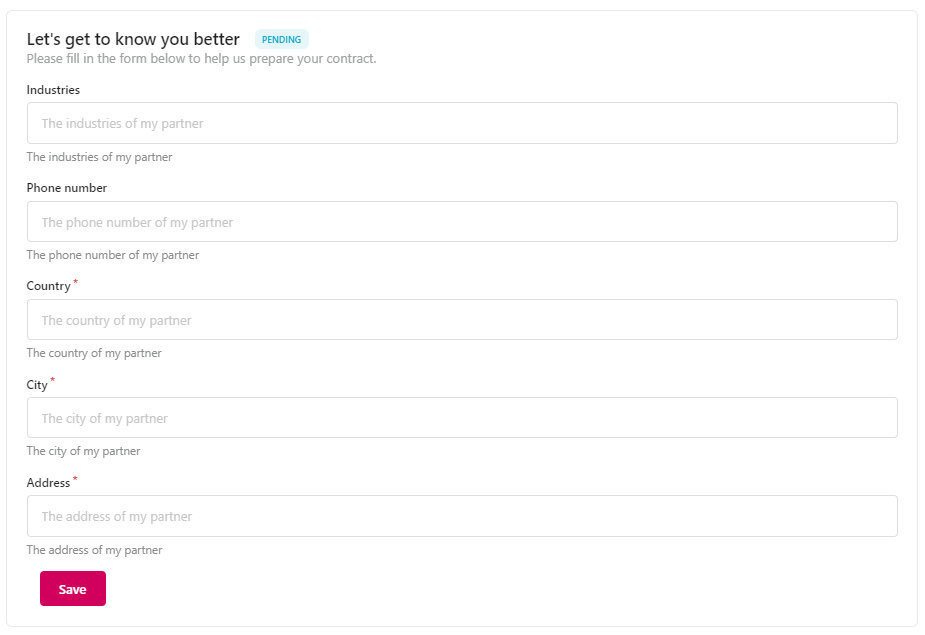
In the example below partners must fill in their company details:

<div data-with-frame="true"><figure><img src="https://3041514930-files.gitbook.io/~/files/v0/b/gitbook-x-prod.appspot.com/o/spaces%2FKkJn82Qo5a0Y4fOsoQzo%2Fuploads%2Fgit-blob-167c0b5a7690fc037d6a3b3d02a97b603edd23e6%2F64ff128b552c88397cb74d52.png?alt=media" alt="Example of provide informatoin action on the partner portal"><figcaption><p>Example of provide informatoin action on the partner portal</p></figcaption></figure></div>

### Upload document

Partners must upload a document (or any file). It can be logos for co-marketing/co-branding or even contracts.

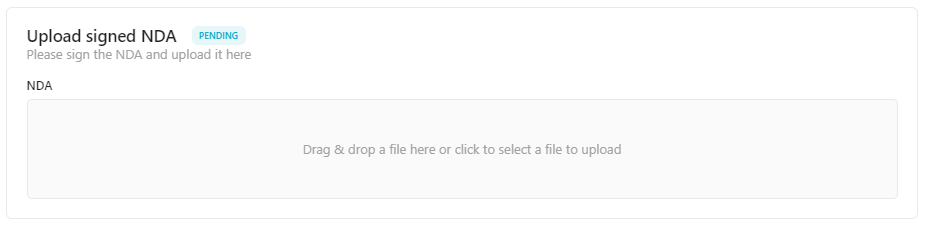
In the example below partners must upload a signed copy of the NDA:

<div data-with-frame="true"><figure><img src="https://3041514930-files.gitbook.io/~/files/v0/b/gitbook-x-prod.appspot.com/o/spaces%2FKkJn82Qo5a0Y4fOsoQzo%2Fuploads%2Fgit-blob-de4f300c1254ea6ccdcbfb8687040a00cb13e314%2F64ff0f6bf15ed05267de572f.png?alt=media" alt="Example of upload document action on the partner portal"><figcaption><p>Example of upload document action on the partner portal</p></figcaption></figure></div>

### Book meeting

Partners must choose a date and schedule a meeting in your calendar. If you use Calendly or HubSpot to book meetings, they can schedule directly from Kiflo.

![](https://3041514930-files.gitbook.io/~/files/v0/b/gitbook-x-prod.appspot.com/o/spaces%2FKkJn82Qo5a0Y4fOsoQzo%2Fuploads%2Fgit-blob-7e1afc9e10f21017b860b953f7aae3322204923c%2F67585d01871b774ab717e295.png?alt=media)

### Opt-in/out from self-invoicing

Partners must enable the self-invoicing option and provide their billing details. This allows you to generate invoices automatically for each payout, removing the hassle for partners to generate and upload invoices manually.

![](https://3041514930-files.gitbook.io/~/files/v0/b/gitbook-x-prod.appspot.com/o/spaces%2FKkJn82Qo5a0Y4fOsoQzo%2Fuploads%2Fgit-blob-1f63dbbbb1a3983e239f4624a9ccea6cebf6ec79%2F67585bb3f6b4a35fc8b68806.png?alt=media)

{% hint style="info" %}
**Next step**

[How to manage onboarding actions?](/manage-partners/onboarding/how-to-manage-onboarding-actions.md)
{% endhint %}


---

# Agent Instructions
This documentation is published with GitBook. GitBook is the documentation platform designed so that both humans and AI agents can read, navigate, and reason over technical content effectively. Learn more at gitbook.com.

## Querying This Documentation
If you need additional information that is not directly available in this page, you can query the documentation dynamically by asking a question.

Perform an HTTP GET request on the current page URL with the `ask` query parameter, and the optional `goal` query parameter:

```
GET https://docs-vnext.kiflo.com/manage-partners/onboarding/what-are-onboarding-actions.md?ask=<question>&goal=<endgoal>
```

`ask` is the immediate question: it should be specific, self-contained, and written in natural language.
`goal` is optional and describes the broader end goal you are ultimately trying to accomplish on behalf of the user. GitBook uses it to tailor the answer towards what is most useful for that goal.

The response will contain a direct answer to the question and relevant excerpts and sources from the documentation.

Use this mechanism when the answer is not explicitly present in the current page, you need clarification or additional context, or you want to retrieve related documentation sections.