> For the complete documentation index, see [llms.txt](https://docs-vnext.kiflo.com/llms.txt). Markdown versions of documentation pages are available by appending `.md` to page URLs; this page is available as [Markdown](https://docs-vnext.kiflo.com/manage-partners/onboarding/how-to-track-partner-onboarding.md).
# How to track and manage the onboarding of a particular partner?
This page describes how to track the current state of the onboarding process for a particular partner.
{% hint style="info" %}
**Before you begin**
Make sure you've read the [Partner Onboarding](/manage-partners/onboarding/partner-onboarding.md) page.
{% endhint %}
## Overview of the Onboarding tab
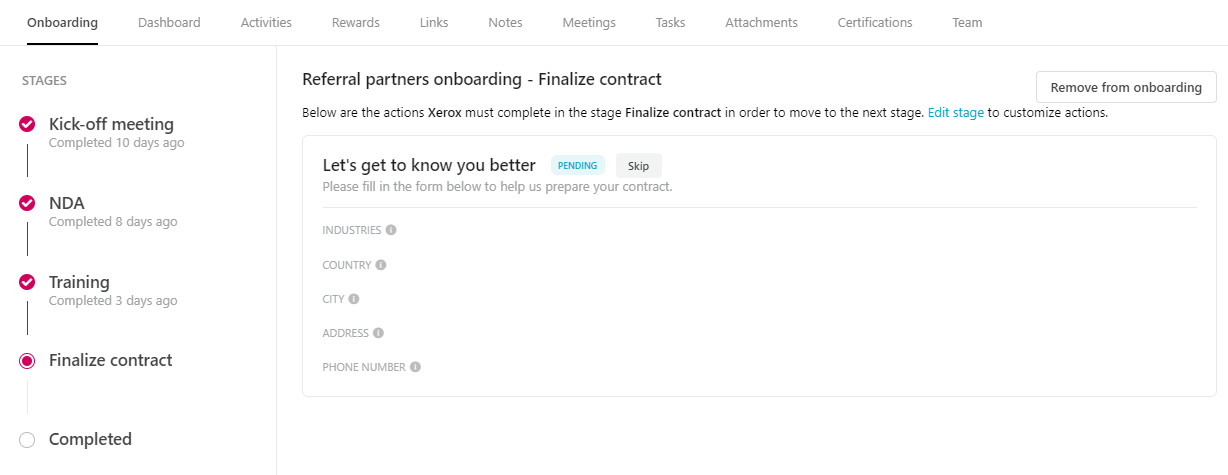
Here is an example of how the onboarding tab looks like when a partner is currently onboarding:
Example of onboarding tab
### Left menu
On the left part, you'll find the list of all stages in the current onboarding pipeline.
**Completed stages**
All stages marked with a tick are completed and below is the date when it has been completed.
**Current stage**
The current stage is marked with a dot (in the example above: "Finalize contract".
**Navigate to stage**
Click on the stage name on the left in order to list all actions defined in this stage.
### Center view
In the center, you'll find:
* The name of the current pipeline and stage at the top (in the example above, the displayed stage is "Finalize contract" in the "Referral partners onboarding".
* The list of all actions defined in that stage. Depending on the status you can validate, invalidate, or skip action for that particular partner only.
## Manage actions
Depending on the status of the action, you could have to validate it or choose to skip it. Here is a description of the different types of actions and their statuses: [What are onboarding actions?](/manage-partners/onboarding/what-are-onboarding-actions.md#overview)
### Validate action
On a given **Waiting for approval** action, click the **Validate** button to mark it as completed. Make sure you've reviewed the information provided by the partner before validating the action.

### Invalidate action
On a given **Completed** action, click the **Invalidate** button to roll back the approval and ask the partner to complete it again:
* The status goes from **Completed** to **Action required**
* The partner is notified and can complete it again
It is only possible for **Completed** actions and only impacts the current partner.
### Skip action
On a given **Pending** action, click the **Skip** button to skip this action. The partner won't have to complete it. It only impacts the current partner.
## Move partners to the next stage
### Automatically
The primary use case for defining actions as part of your onboarding process is to automate partner onboarding. When the last action in a stage is marked as Completed, the partner automatically moves to the next stage. You have nothing to do!
### Manually
You may have stages in your onboarding pipeline without actions. It happens if *you* have to complete actions but not partners.
In this case, it's up to you to move the partner to the next stage and you are ready. Just click the **Move partner to the next stage** button:

The stage is marked as Completed, the partner is moved to the next stage, and they can start completing the next actions.
---
# Agent Instructions
This documentation is published with GitBook. GitBook is the documentation platform designed so that both humans and AI agents can read, navigate, and reason over technical content effectively. Learn more at gitbook.com.
## Querying This Documentation
If you need additional information that is not directly available in this page, you can query the documentation dynamically by asking a question.
Perform an HTTP GET request on the current page URL with the `ask` query parameter, and the optional `goal` query parameter:
```
GET https://docs-vnext.kiflo.com/manage-partners/onboarding/how-to-track-partner-onboarding.md?ask=&goal=
```
`ask` is the immediate question: it should be specific, self-contained, and written in natural language.
`goal` is optional and describes the broader end goal you are ultimately trying to accomplish on behalf of the user. GitBook uses it to tailor the answer towards what is most useful for that goal.
The response will contain a direct answer to the question and relevant excerpts and sources from the documentation.
Use this mechanism when the answer is not explicitly present in the current page, you need clarification or additional context, or you want to retrieve related documentation sections.