> For the complete documentation index, see [llms.txt](https://docs-vnext.kiflo.com/llms.txt). Markdown versions of documentation pages are available by appending `.md` to page URLs; this page is available as [Markdown](https://docs-vnext.kiflo.com/leads-deals/submission-forms/customize-the-deal-registration-form.md).
# How to customize the Deal Registration Form?
You will need to customize the deal form in order to gather more precise information on your deals. The deal form will also guide your partners on the information you expect them to gather on deal registrations.
## Deal registration has three elements
Deal registration has three customizable elements.
1. New Deal - This form will gather all the information on a deal like the name of the deal, expected close date, amount, etc.
2. Line Items - This form will gather information on any products your partners might want to reseller and the quantities also.
3. Client Information - This form allows you to gather all the necessary information on the end customer.
{% hint style="info" %}
**Enable Line Items during deal registration**
The default deal registration process does not include line items in Kiflo. If you would like to allow partners to select products during the deal registration please see this link: [How to allow resellers to select products during deal reg?](/leads-deals/products-quotes/resellers-select-products-deal-reg.md)
{% endhint %}
## How to customize the deal form?
Here is a step-by-step guide to customize your deal form:
* Click the top right corner menu
* Click on **Account Settings**
* Go to **Properties**
* And the **Deals** tab

* On this page, you can add or delete properties attached to each deal. These fields will be shown on each deal but also on your partner's deal registration form. You can choose specific permissions and behaviors for each property.
* **Contacts** under properties refer to **Client Information** on a deal registration

{% hint style="info" %}
**Important articles on lead properties**
Please see the following articles:
1. [How to change properties visibility for partners?](/account-settings/properties/change-properties-visibility.md)
2. [How to customize properties?](/account-settings/properties/customize-properties.md)
{% endhint %}
## What are the best practices for deal forms?
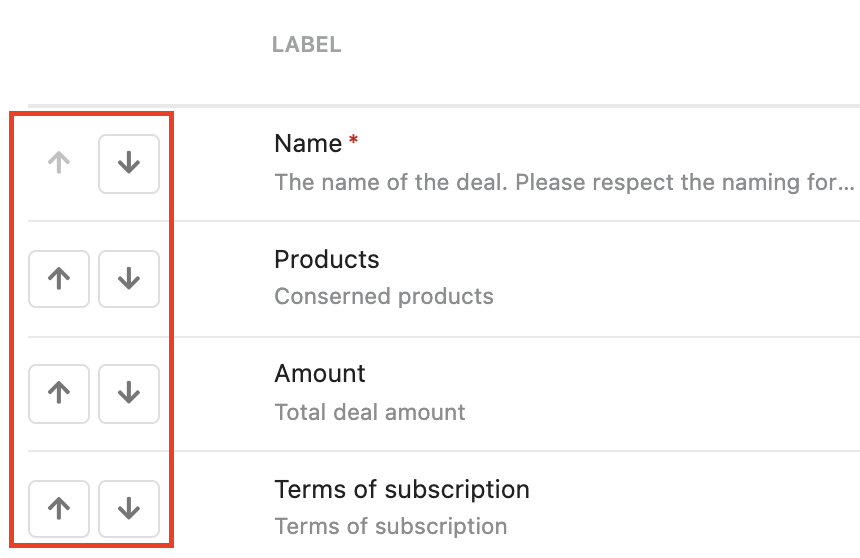
* Required fields need to be first/top of the deal form
* This will ensure your partners enter the required details first as a priority and know what you expect of them. In order to place properties on the form in a certain order, please see the screenshot below:
* Limit fields on your deal form for simplicity
* By simple, we mean keep the list of properties you expect from your partners on a deal short, and also properties that are easy to attain from people.
* Choose the correct "Type" when creating properties
* This will ensure your partners enter the correct data and in the correct format. When you create a new property you can choose a type.
* Adding a Placeholder when creating properties
* These will guide your partners on the expected answer. When you create a new property you can add a placeholder.
---
# Agent Instructions
This documentation is published with GitBook. GitBook is the documentation platform designed so that both humans and AI agents can read, navigate, and reason over technical content effectively. Learn more at gitbook.com.
## Querying This Documentation
If you need additional information that is not directly available in this page, you can query the documentation dynamically by asking a question.
Perform an HTTP GET request on the current page URL with the `ask` query parameter, and the optional `goal` query parameter:
```
GET https://docs-vnext.kiflo.com/leads-deals/submission-forms/customize-the-deal-registration-form.md?ask=&goal=
```
`ask` is the immediate question: it should be specific, self-contained, and written in natural language.
`goal` is optional and describes the broader end goal you are ultimately trying to accomplish on behalf of the user. GitBook uses it to tailor the answer towards what is most useful for that goal.
The response will contain a direct answer to the question and relevant excerpts and sources from the documentation.
Use this mechanism when the answer is not explicitly present in the current page, you need clarification or additional context, or you want to retrieve related documentation sections.